Start here · Updated 2026-07-04 · By Ge Gao
How to Use Claude Sonnet 5 — The Complete Guide
Every way to use Claude Sonnet 5 — free on claude.ai, in Claude Code, via the API, or inside tools like Cursor. Setup steps, plan advice and prompting tips.
The fastest way to use Claude Sonnet 5 is to go to claude.ai, sign up for a free account, and start chatting — Sonnet 5 has been the default model on the Free and Pro plans since July 1, 2026, so there is nothing to configure. From there it depends on what you want to do: code in a terminal or editor, build an app, or call the model from your own software.
This guide covers all four routes, in order of effort.
1. On claude.ai — the zero-setup route
Claude Sonnet 5 shipped on June 30, 2026, and a day later Anthropic made it the default model for Free and Pro users. To use it:
- Go to claude.ai and create an account (no credit card needed).
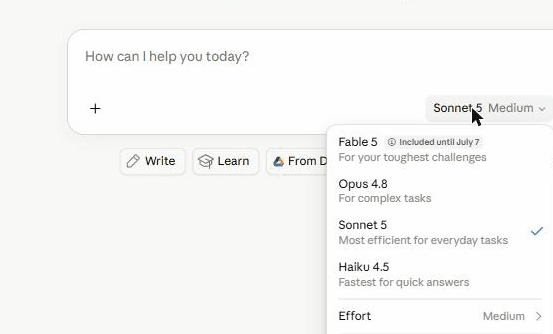
- Start a chat — you're already on Sonnet 5. You can confirm via the model picker under the chat box; here's what it looks like on our own account:
- Free accounts get roughly 15–40 messages every 5 hours (it varies with demand), plus file uploads, web search, Projects and Artifacts.
If you keep hitting the limit, Claude Pro (~$20/month) raises it substantially and adds priority access. Our take: try the free plan for a week first — the limits are workable for casual use, and you'll know quickly if you need more.
2. In Claude Code — for terminal-first coding
Claude Code is Anthropic's command-line agent, and Sonnet 5 is now its default model for Pro users. It's the strongest way to experience what Sonnet 5 is actually best at: agentic work — planning, running tools, and finishing multi-step jobs on its own. It's also the route we know best first-hand: this site is built and maintained in Claude Code. We wrote a dedicated walkthrough: how to use Sonnet 5 in Claude Code.
3. Inside coding and writing tools
Most of the best AI tools added Sonnet 5 within days of launch — Cursor, Windsurf and Cline on the coding side, and platforms like Copy.ai and Writesonic for writing. If you'd rather work in an editor GUI than a terminal, start with our best AI coding assistants ranking; for content work, see the best AI writing tools. Builders like Lovable run Sonnet-class models under the hood too — see AI app builders.
4. Via the API — for developers
Sonnet 5 is available on the Claude API under the model ID claude-sonnet-5. Standard pricing
is $3 input / $15 output per million tokens, with introductory pricing of $2 / $10 running
through August 31, 2026 — check Anthropic's pricing page
for current numbers. It supports a 1M-token context window. The
Anthropic docs cover authentication and the messages API;
if you're choosing between models, our
Opus 4.8 vs Sonnet 5 comparison has the honest trade-offs.
Getting better results out of Sonnet 5
Sonnet 5's step up over Sonnet 4.6 is mostly in reasoning, tool use and long agentic runs, so prompt it accordingly:
- Give it whole jobs, not fragments. It plans well — "refactor this module and update the tests" beats ten micro-instructions.
- Provide context files. In tools that support it (Claude Code, Cursor, Projects on claude.ai), persistent context noticeably improves output.
- Escalate only when needed. Sonnet 5 handles most work; if it stalls on genuinely hard reasoning, that's what Opus 4.8 is for.
Frequently asked questions
Is Claude Sonnet 5 free to use?
Yes. Claude Sonnet 5 is the default model on claude.ai's Free plan, with roughly 15–40 messages every 5 hours. Paid plans raise the limits; the model itself is the same. See our full guide to using Sonnet 5 free.
How do I know I'm using Sonnet 5 and not another model?
On claude.ai, open the model picker under the chat input — it shows the active model. Free and Pro accounts default to Sonnet 5. In Claude Code, run /model to see and change the active model.
What is Claude Sonnet 5 best at?
Coding and agentic work — planning, using tools like browsers and terminals, and running autonomously — at a much lower price than Opus 4.8. Benchmarks from tool makers like Cursor and Cognition showed it at or near Opus-level on real coding tasks.
Can I use Claude Sonnet 5 in ChatGPT-style apps other than claude.ai?
Yes. Assistant apps like Merlin, Monica and Sider let you switch between Claude and other models in one subscription. See our comparison of Claude chat apps for details.
Does Claude Sonnet 5 have a context window limit?
Sonnet 5 supports a 1M-token context window via the API — enough for entire codebases or very long documents. Limits inside claude.ai are lower and vary by plan.